
Table of contents of the article:
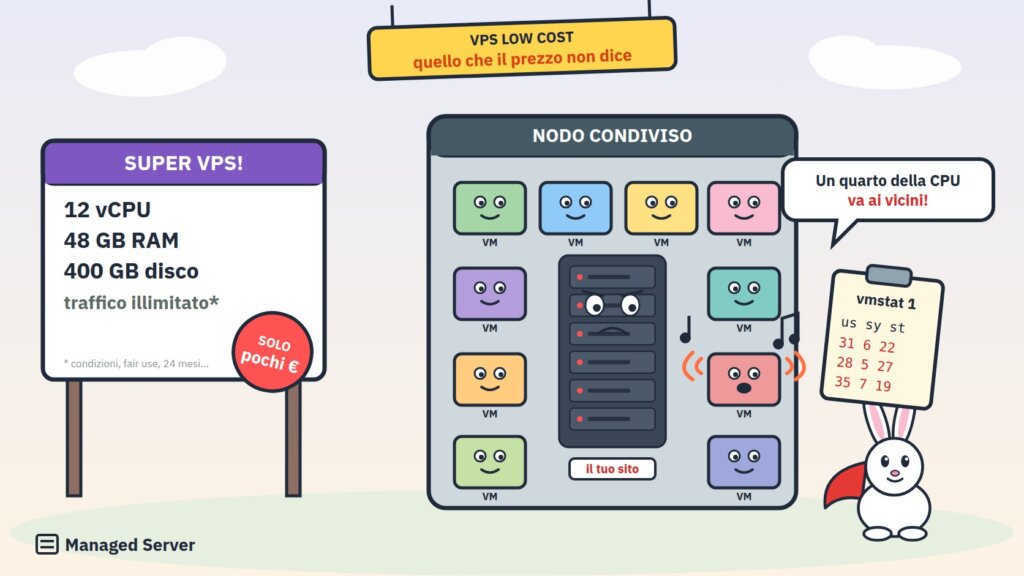
A few euros a month for 4 vCPUs and 8 GB of RAM. Around twenty euros for 12 vCPUs, 48 GB of RAM, and hundreds of gigabytes of disk space. Unlimited traffic, ports up to 1 Gbps, DDoS protection included. On paper, Contabo's VPS seems like a deal impossible to refuse, and it's no coincidence that they're among the most popular in forums, developer groups, and guides "how to get WordPress online on a budget."
The problem is that on paper, a server is made of numbers, while in production it's made of behaviors. A VPS with 12 vCPUs and 48 GB of RAM isn't necessarily faster than a server with 4 cores and 16 GB. 400 GB of storage isn't necessarily suitable for a database. A 1 Gbps port doesn't mean you can transfer data at 1 Gbps. And the monthly fee, however low, is almost never the true cost of the infrastructure on which a business runs.
In this article, we analyze ten technical and financial aspects anyone should consider before deploying a WordPress, WooCommerce, PrestaShop, or database application on a Contabo VPS. We do this as Linux system administrators, relying on the official documentation and the provider's terms and conditions, listed at the end of the article. This isn't to say that Contabo is a bad provider overall, but to explain why a very low price and generous specifications only tell part of the story.
1. vCPUs are not dedicated physical cores
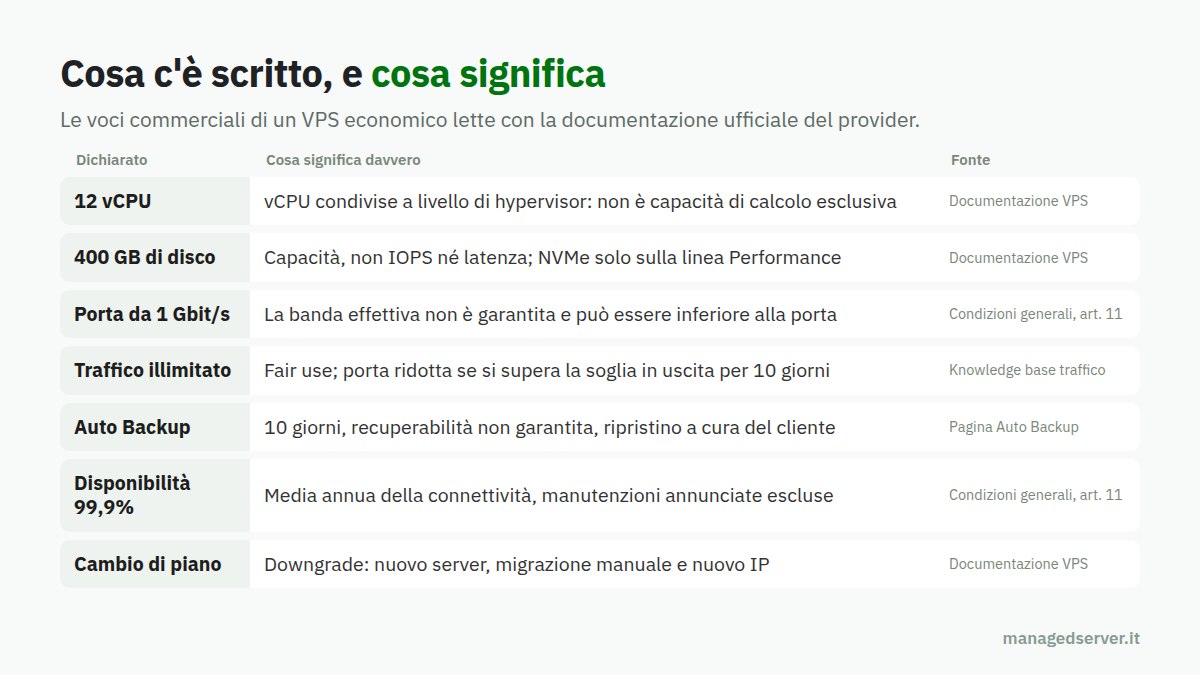
The first thing to understand is what you're buying when you see "8 vCPUs." A vCPU is a virtual processor: the hypervisor maps it, from time to time, to a thread on a physical processor that is shared among multiple virtual machines. It's not a core reserved exclusively for the client.
Contabo explicitly states this: its documentation describes VPS as KVM-based virtual servers with shared vCPU cores, and specifies that CPU and RAM are dedicated allocations but shared at the hypervisor level. To have dedicated cores, you need to upgrade to a different product, the Max Performance VPS. Furthermore, for the Core VPS line, the documentation mentions an infrastructure that includes multiple CPU generations, while only the Performance line uses the most recent AMD EPYC generations.
What does this mean in practice? That the number of vCPUs indicates how many threads the virtual machine can use simultaneously, not how much compute capacity is guaranteed. If the physical node is loaded, eight shared vCPUs can perform less than four dedicated cores, and they can do so differently from hour to hour.
For web applications, this is more important than you might think. A PHP request is executed by a single process, on a single core: having many vCPUs helps serve more requests in parallel, but it doesn't make the individual page faster. The same goes for a MySQL or MariaDB query, which in the vast majority of cases uses only a single thread. For the TTFB of an uncached WooCommerce page, the speed of the individual core and how much of that core is actually available are what matters most.
The key concept is simple: purchasing a large number of vCPUs does not mean purchasing the corresponding exclusive compute capacity.
2. CPU stealing and the problem of noisy neighbors
When multiple virtual machines share the same physical cores, one of them may need CPU just as the hypervisor is assigning it to another. This is known as a noisy neighbor : another client on the same node, compressing video, running builds, mining, or simply having a lot of traffic, is consuming resources that you would actually need.
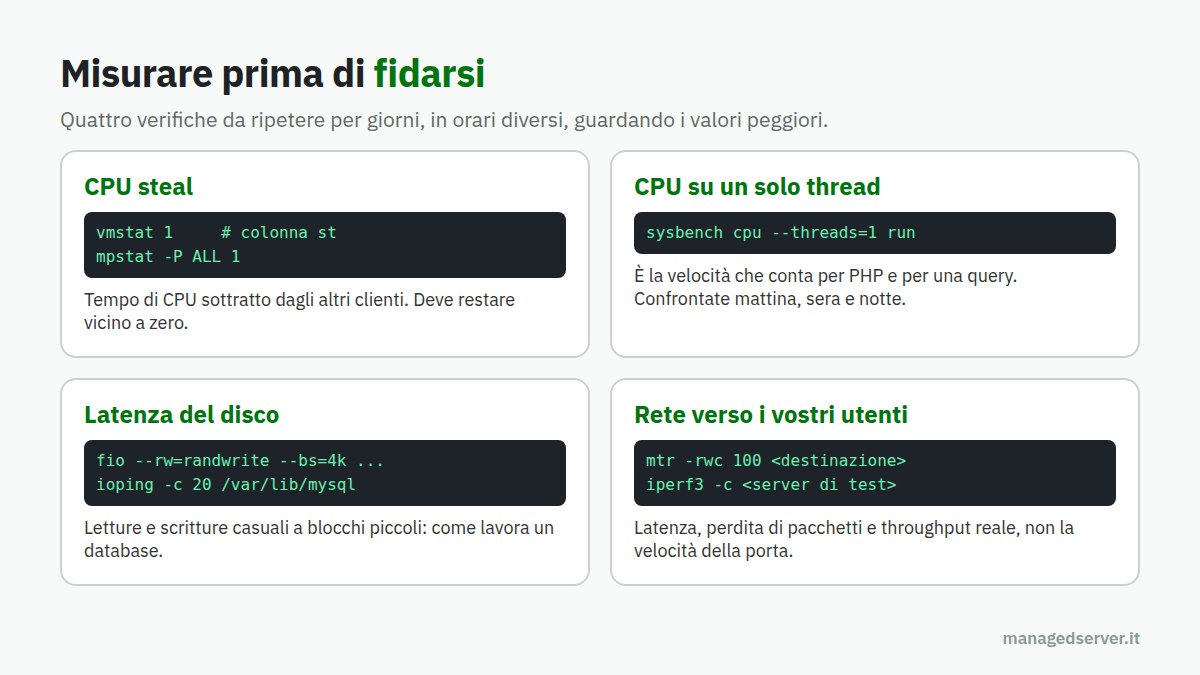
Linux makes this phenomenon visible with the parameter %steal, the time in which the virtual CPU was ready to work but had to wait because the hypervisor was serving other machines. It is read with top (column st), with vmstat 1 (column st) or with mpstat -P ALL 1 of the sysstat package. A value consistently close to zero is what you'd expect from a healthy server. Constant double-digit values mean that a significant portion of the computation time you're paying for isn't being delivered to you.
It's important to be clear: the risk is typical of any shared infrastructure; it's not exclusive to a single provider, and it doesn't mean every Contabo node is affected. It just means it needs to be measured. A test with sysbench cpu run repeated at different times, together with monitoring the steal for a few days, says much more than any commercial card.
The point, for a production site, is that performance variability can be more damaging than an average slow CPU. A slow but consistent CPU scales. A CPU that runs fine at 11 AM but loses a quarter of its capacity at 21 PM, during peak shopping time, creates problems that are difficult to diagnose and impossible to predict.
3. Lots of disk space doesn't mean fast storage
One of the strongest selling points for budget VPSs is space: hundreds of gigabytes for just a few euros. But for a web application, capacity is almost always the least important feature. What matters are throughput, i.e., how many megabytes per second can be read and written; IOPS, i.e., how many random read and write operations per second; and, above all, latency, i.e., how long a single operation takes.
Contabo officially distinguishes between its Core VPS offerings, with SSD storage, and its Performance VPS offerings, with NVMe PCIe Gen 4. For Storage VPS plans, the documentation specifies that they are sized for capacity, not peak throughput. This alone should give pause to those who choose a plan based solely on gigabytes.
Even the presence of NVMe, however, doesn't automatically guarantee high performance. On a virtual server, storage is shared with other clients, passes through the virtualization layer, and may be limited by provider policies. A local NVMe disk on a dedicated server and shared NVMe storage on a crowded node can behave very differently.
For databases, the difference is enormous. MySQL, MariaDB, and PostgreSQL write transaction logs, flush to disk with each commit, and read index pages randomly when the data doesn't all fit in memory. A write latency of a few milliseconds per commit, multiplied by orders, carts, and e-commerce sessions, translates into slow checkouts and accumulating locks.
The tools to verify this are known: fio to measure IOPS and latency with 4KB block random reads and writes, ioping for the latency of the single operation, iostat -x 1 To observe utilization and wait times during real-world load. For a database, 100 GB of fast storage is much more valuable than 500 GB of slow storage.
4. Performance is not necessarily consistent and predictable
There's a common mistake: you activate the VPS, run a benchmark, the results are good, and you conclude that the server is fast. But a one-time benchmark measures peak performance at that precise moment, not sustained performance over time.
On a shared infrastructure, the two can differ significantly. The CPU may be fully available during testing and then subject to contention in the evening. Storage may respond in microseconds when the disk is empty and slow down when other clients on the same node perform their nightly backups.
For a commercial website, this translates directly into response times. Pages served from the cache remain fast almost always, but everything the cache doesn't cover—such as the shopping cart, checkout, customer area, searches, filters, and the admin panel—is generated with each request by PHP and the database. There, any variations in CPU and disk latency end up in the TTFB, and that's precisely where the customers who are about to pay are. We've discussed this at length, explaining why web caching doesn't solve problems.
The correct way to evaluate a VPS is to repeat the measurements in different time slots, over multiple days, and look at the worst-case results, not the average. For an e-commerce business, performance under the worst-case scenarios matters, not the best result obtained with a benchmark run at 3:00 a.m.
5. Advertised bandwidth does not equate to guaranteed bandwidth
Contabo VPSs have ports ranging from 200 Mbps to 1 Gbps, depending on the plan. This is a real figure, but it should be interpreted as such: the nominal speed of the switch port, not the bandwidth the server will always have available.
Contabo's contractual conditions are explicit on this point: unless otherwise agreed, the provider cannot guarantee the actual bandwidth available, which may not correspond to the port's theoretical maximum bandwidth. This is a common clause among many providers, and it's fair, but it disproves the idea that "1 Gbps port" means "I can transfer at 1 Gbps whenever I want."
Besides the port, routing, the quality of peering with the operators your visitors are coming from, and latency to their countries are also important. An Italian site with Italian customers primarily needs good latency to Italian networks, rather than a nominal gigabit.
Here too the answer is to measure: iperf3 to a test server near your users for throughput, mtr to see path, packet loss and latency, and most importantly, actual transfers, such as downloading a backup to your external storage, repeated at different times.
6. Unlimited traffic isn't really without strings attached
"Unlimited traffic" is one of the most effective marketing strategies, and also one of the most misunderstood. In Contabo's documentation, unlimited traffic is marked with an asterisk: there is no predefined bandwidth limit, but a fair usage policy applies, and the provider can throttle servers with exceptionally high usage or that disrupt other customers.
The provider's knowledge base also describes a more precise mechanism: incoming traffic is not counted, while for outgoing traffic, each packet has a threshold, and if it is exceeded for ten consecutive days, the port speed is reduced, up to 100 Mbps for the smallest packets.
For a typical business website, this is almost never a problem. It becomes a problem for high-traffic editorial sites, those distributing files, videos, or software updates, those streaming content, or those using the VPS as a large-scale backup destination. In these cases, it's important to understand in advance that "unlimited" means "without a billing threshold," not "any usage, without restrictions, forever."
7. Snapshots and backups are not the same thing
This is the point we consider most important, because it is the one that causes the most damage when we realize we have underestimated it.
A snapshot is an image of the VPS disk at a specific point in time. It's useful before a risky upgrade, allowing you to roll back within minutes. But it's not a disaster recovery strategy: it lives on the same platform as the server, it also captures errors, and a snapshot of a database being written isn't necessarily a consistent backup of the database.
Contabo offers an additional service, Auto Backup: daily copies stored on a separate storage system for up to ten days. The restore operation overwrites the current data on the VPS, which remains unavailable until the restore operation is complete. The service's FAQ page explicitly states that the provider does not guarantee data recoverability and does not perform restores on the customer's behalf.
The general terms and conditions are also consistent: the provider is required to perform backups only to the extent permitted by the service, and the customer is responsible for regularly backing up their data. There's nothing wrong with this; it's the model of an unmanaged service. But those who read "backup included" and think they're covered often aren't.
A serious strategy for a production application requires at least: consistent application backups and database dumps, performed with the right tools; copies on an infrastructure independent of the server provider; adequate retention, because an infection or data corruption is often discovered after weeks, not days; and, above all, periodic restore tests. It's not enough to know that a backup is being performed: you need to know whether, how, and how quickly it will be possible to restore it, even a single file or table.
8. A cheap VPS does not include system management
Contabo's standard VPS services are unmanaged, and the provider makes this clear: the customer is responsible for server administration, software installation, and security. Support covers infrastructure issues, such as networking, hardware failures, and platform questions. For software and configuration information, refer to the documentation, knowledge base, and blog.
It's a legitimate division of labor, but it needs to be translated into concrete work. Someone needs to configure and maintain the firewall, apply security updates to the operating system and kernel, manage PHP versions, the web server, the database, and the cache. Someone needs to size PHP-FPM and MariaDB, configure monitoring, receive alerts at 2 a.m., figure out why the site is slow on Monday morning, and intervene when a compromised plugin starts sending spam or when the disk fills up with logs.
There's also a fundamental difference between infrastructure support and application support. If the server is up and running, from the provider's perspective, the service is working. If WordPress responds with a 502 error because PHP has run out of processes, or if MariaDB is blocked by a slow query, or if the SSL certificate has expired, that's the client's problem.
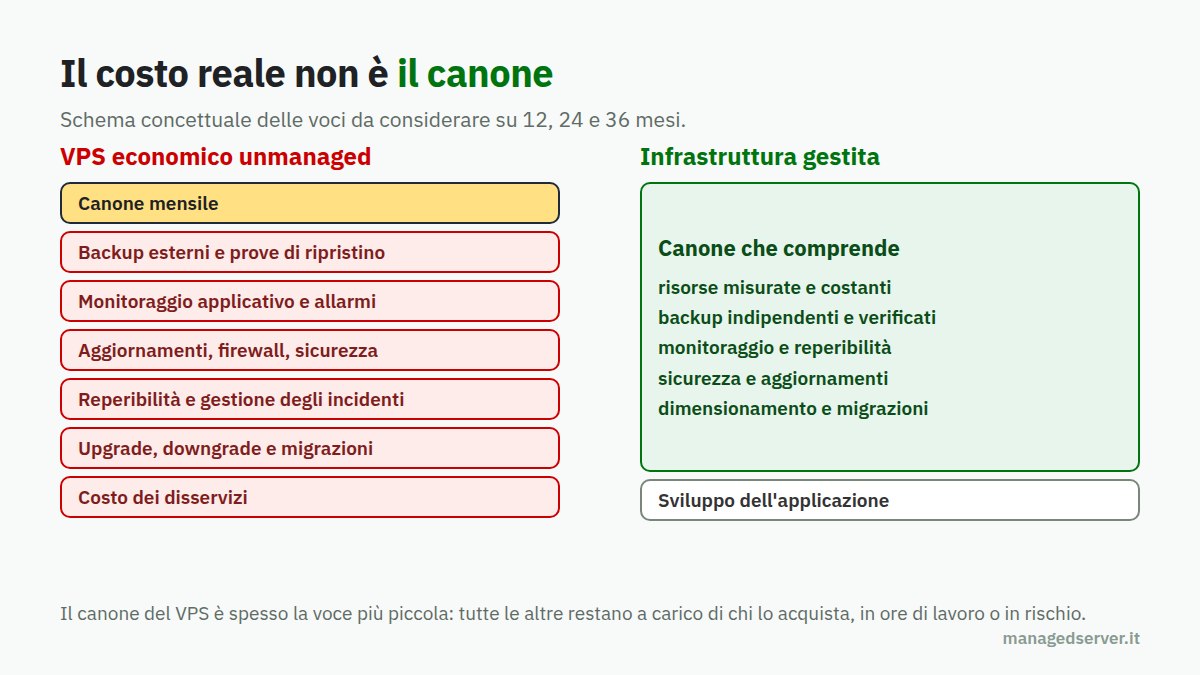
All this comes at a cost: hours of a skilled systems engineer, on-call time, monitoring tools, time wasted when something goes wrong. Saving ten or twenty euros a month on the fee and then having to cover all the system management costs yourself is rarely a good deal. It's the same reasoning that in managed services, as we explain when discussing why the root password isn't provided , technical responsibility rests with the actual manager.
9. Server availability and service availability are two different things
Contabo's contractual terms indicate an average annual availability of 99,9% for service connectivity, excluding, among other things, pre-announced maintenance periods and interruptions due to causes beyond the provider's control. This figure is in line with the market, but it must be interpreted carefully.
99,9% annualized corresponds to just under nine hours of permitted downtime per year, and scheduled maintenance doesn't count. Above all, the SLA concerns infrastructure connectivity: it guarantees that the server is reachable, not that your website is up and running, nor that it responds within acceptable timeframes.
A running server doesn't mean a functioning website. Your VPS may be perfectly reachable while WooCommerce is returning errors, the database is crashing, the disk is full, or an automatic update has broken a dependency. For an e-commerce site that generates thousands of euros a day, even a single hour of downtime at the wrong time can cost more than years of service fees.
This requires application monitoring that checks real pages and not just pings, documented disaster recovery procedures, and, for critical projects, an architecture that doesn't rely on a single VPS.
10. The low initial price doesn't tell the whole story
The price displayed on the Contabo website is, as the page itself indicates, the effective monthly fee for a twenty-four-month subscription. This is an important detail when comparing offers: the fee you see isn't necessarily the one you'd pay with a monthly contract, and the general terms and conditions stipulate that prices may be adjusted over time, with the customer's right of withdrawal. Contracts are automatically renewed, and cancellation requires four weeks' notice prior to the expiration date.
Then there are the additional costs: backups, additional storage, any control panel licenses, an independent external backup system, monitoring, and security. And there's a less visible cost: when the initial resources aren't enough, the simplest solution is to upgrade. The upgrade happens on-site and keeps the IP address, but the reverse is not as simple.
The official documentation is clear: there's no direct downgrade. To move to a smaller plan, you need to purchase a new server, manually migrate your data, and accept an IP address change. Switching between Core, Performance, and Storage families is also not straightforward, and converting from SSD to NVMe requires a reinstallation that erases all your data. Each manual migration means hours of work, an outage window, DNS changes, and the risk of forgetting something.
The correct way to compare two solutions is to calculate the total cost of ownership over twelve, twenty-four, and thirty-six months: rental fee, additional services, system management hours, monitoring, external backups, estimated cost of downtime and migrations. The cheapest VPS at the time of purchase isn't necessarily the one that costs the least over its life cycle. We also discussed this in How to Save on Dedicated Servers.
When a Contabo VPS makes sense
It would be incorrect to conclude that Contabo VPSs are useless. They're a reasonable choice for many uses: development and testing environments, labs, personal projects, non-critical internal services, secondary nodes, and applications that require a lot of RAM or space but tolerate variable performance. In expert hands, with monitoring, independent backups, and a good system administrator behind them, even a budget VPS can do the job.
The problem arises when it is chosen as the basis for a business based solely on the price/vCPU ratio, without measuring actual performance, without a backup strategy, and without anyone actually managing its security and operation.
How to evaluate a VPS before entrusting it with production
Whether you choose Contabo or another provider, some checks should become a habit.
- Measure CPU steal for a few days, with
vmstatompstat, during the hours when your site is working the hardest. - Measure single-thread CPU with
sysbenchat different times and compare the worst values, not the average. - Measure disk latency with
fioeioping, with random reads and writes in small blocks, like a database works. - Measure the network towards your users with
mtreiperf3, and with real transfers. - Read the contractual conditions: SLA, exclusions, bandwidth, fair use, backups, renewals, plan changes.
- Decide who manages the server, who responds to alarms and who restores data, before it is needed.
- Calculate the cost over three years, not in the first month.
Conclusions
Affordable VPSs have made resources accessible that, until just a few years ago, cost much more. But a server isn't measured by the number of vCPUs, the gigabytes of disk space, or the nominal port speed. It's measured by how much computing power it actually delivers, how consistently, how much storage latency, what data guarantees it has, and who is responsible when something goes wrong.
For a showcase site or a test environment, saving money can be the right choice. For an e-commerce site, a subscription service, or a revenue-generating application, server costs are almost always the least important item on the bill.
At Managed Server, we design and manage dedicated servers and infrastructure for WordPress, WooCommerce, PrestaShop, and Magento with metered resources, independent and verified backups, application monitoring, and Linux system support . If you're considering where to move your project, or if you're already using a budget VPS and aren't sure what would happen in the event of a failure, we can help you plan ahead before the unexpected happens.
Sources
- Accounting, VPS documentation: shared vCPUs, SSDs and NVMe, ports, fair use, snapshots, upgrades and downgrades.
- Account, general conditions: 99,9% availability, non-guaranteed bandwidth, backup obligations, pricing, duration and cancellation.
- Account, Auto Backup: 10-day retention, restore, recoverability not guaranteed.
- Contabo, traffic rules: exit thresholds and door speed reduction.
- Contabo, Unmanaged VPS: customer responsibility and support scope.

