
Table of contents of the article:
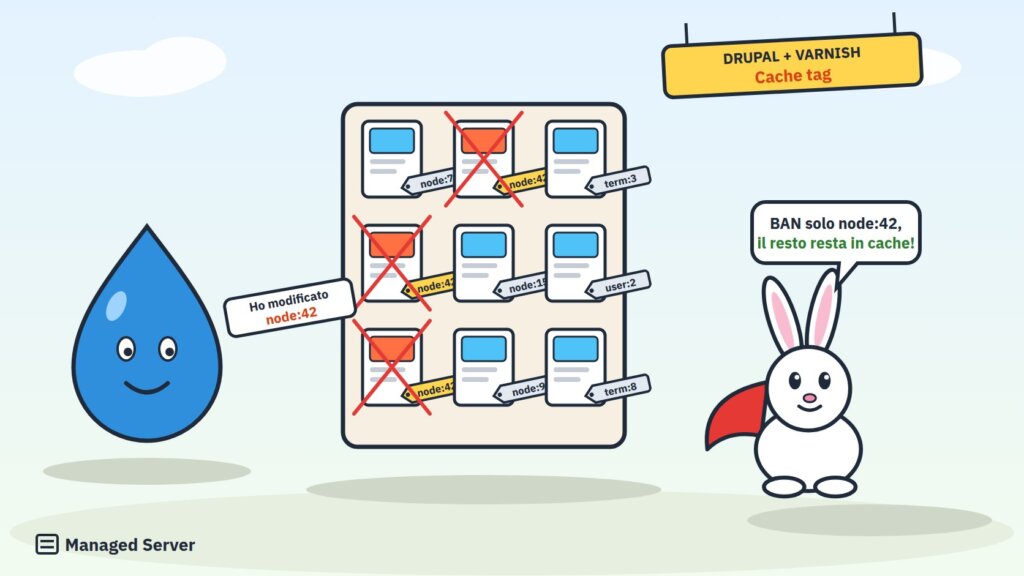
Among the most popular CMSs, Drupal is probably the best suited to work with Varnish. From version 8 onwards, it knows exactly which pages contain a certain content and declares this in every response, via cache tags . This is invaluable information for a reverse proxy: it allows pages to be cached for a very long time and, when an editor modifies an article, only the pages that display it are discarded.
Yet, in most of the installations we analyze, this option isn't used. You end up with extremely short TTLs for fear of displaying stale content, or with complete cache flushes after every change. In both cases, the server works much harder than necessary. In this article, we'll look at how Drupal's cache levels work, how to connect cache tags to Varnish, and what pitfalls to avoid.
Drupal Cache Levels
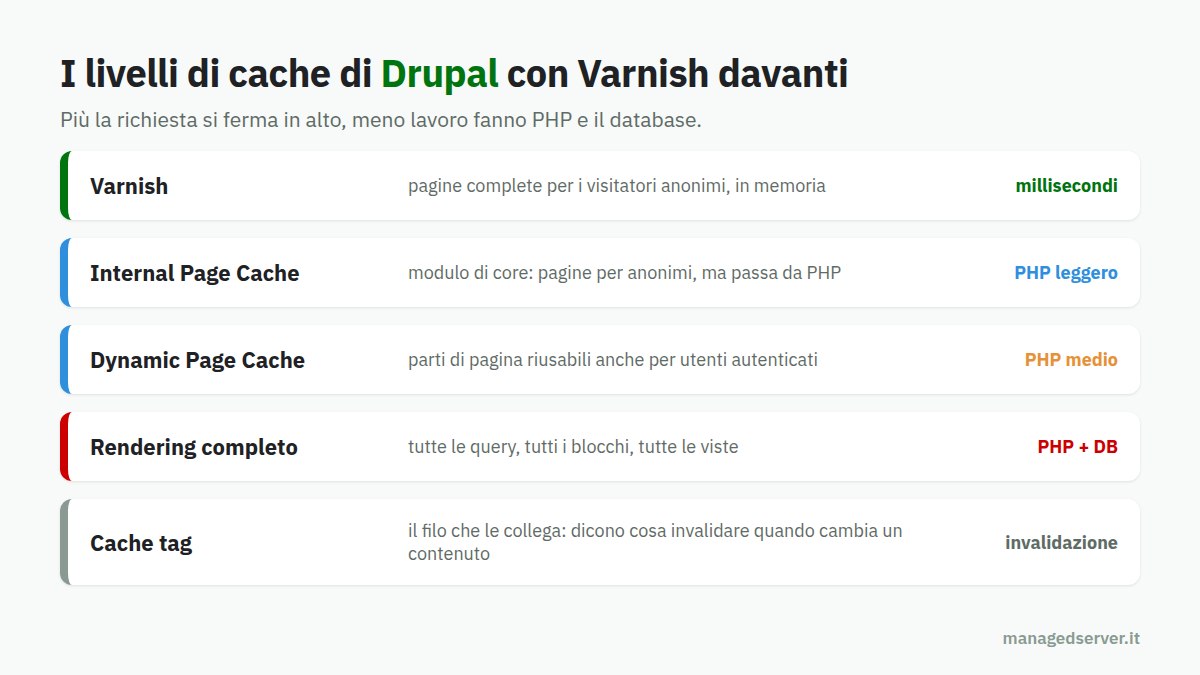
Drupal has two page caches in the core, which run inside PHP:
- Internal Page Cache It preserves entire pages for anonymous visitors. It's fast, but each request still runs PHP and Drupal bootstrap;
- Dynamic Page Cache It preserves reusable page parts and also works for authenticated users, reconstructing only the personal portions.
Varnish outperforms both: once it has the page in memory, the request doesn't even reach the web server, and PHP isn't started. It's the fastest layer, and it's the one that makes the difference during traffic spikes. The weak point, if configured without cache tags, is knowing when a page has become stale.
Cache Tags: What They Are and Why They Change Everything
Every time Drupal builds a page, it keeps track of everything it's used: the root node, blocks, taxonomy terms, users, and configurations. Each of these elements has a label, a cache tag, like node:42, taxonomy_term:3 o config:system.siteWhen an element changes, Drupal invalidates all caches bearing that tag.
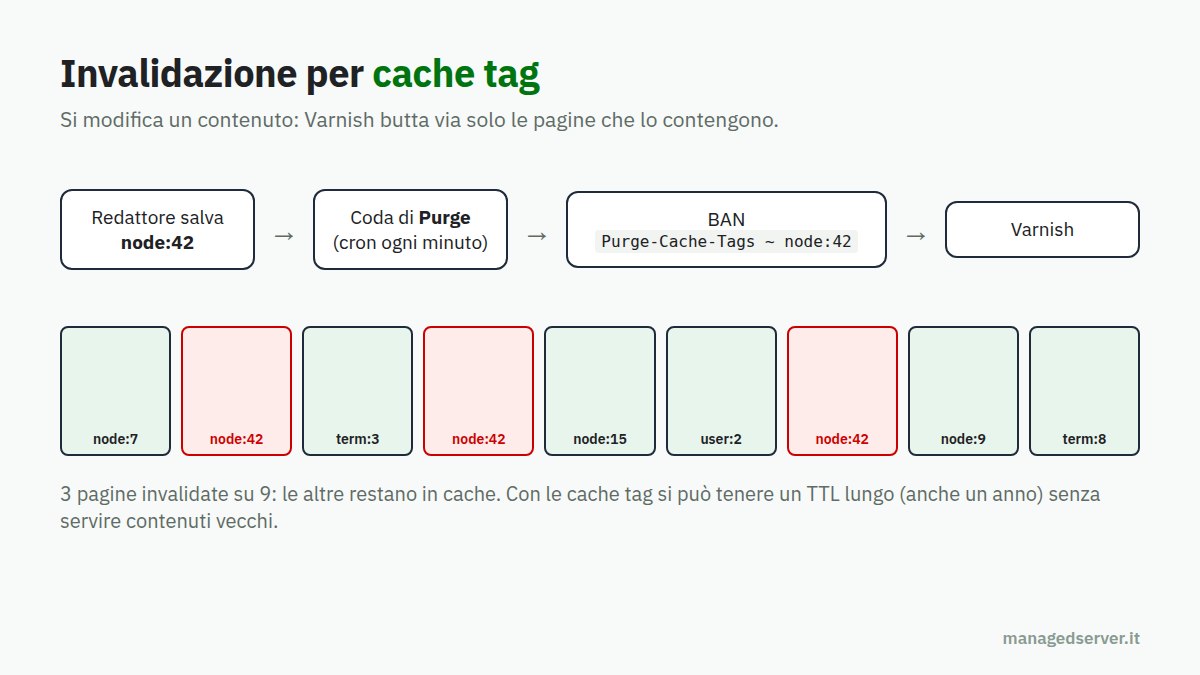
Within Drupal, this mechanism works automatically. To extend it to Varnish, two things are needed: Drupal must declare the tags in responses , in an HTTP header that Varnish stores with the page, and Drupal must ask Varnish for each change to invalidate pages containing that tag. The result is seemingly impossible behavior: extremely long TTLs, even a year, and constantly updated content.
Connecting Drupal to Varnish: Purge Modules
The Drupal documentation describes a configuration based on two components:
- the module Purge, which collects the invalidations in a queue and sorts them;
- un purge, which translates them into requests for Varnish. The documentation uses the Generic HTTP Purger, which adds the header to the responses
Purge-Cache-Tagsand send BAN requests to Varnish; there is also the Varnish Purger, which uses the headerCache-Tags.
We recommend configuring two HTTP purgers: one "tag" type, which invalidates pages with a certain tag, and one "everything" type, which is used for complete purging. An important tip: don't activate the submodules of two different purgers that add the tag header at the same time; otherwise, each response will return two copies of the list, and the headers will grow unnecessarily.
The purge queue must be processed. The documentation advises against using a "late runtime" processor, which processes every request and puts a heavy load on the server, and suggests running a cron job every minute (for example, with Ultimate Cron) or, for testing and maintenance, the command drush p:queue-work.
The VCL configuration
A base for Varnish 6 or 7, built on guidance from the Drupal documentation and the Varnish for Drupal tutorial :
vcl 4.1;

acl purge {
    "127.0.0.1";
    "::1";
}

sub vcl_recv {
    # Invalidazione per cache tag, solo dal server stesso
    if (req.method == "BAN") {
        if (!client.ip ~ purge) {
            return (synth(403, "Non autorizzato"));
        }
        if (!req.http.Purge-Cache-Tags) {
            return (synth(400, "Purge-Cache-Tags mancante"));
        }
        ban("obj.http.Purge-Cache-Tags ~ " + req.http.Purge-Cache-Tags);
        return (synth(200, "Ban eseguito"));
    }

    if (req.method != "GET" && req.method != "HEAD") {
        return (pass);
    }
    if (req.http.Authorization ||
        req.url ~ "^/(admin|user|batch)" ||
        req.url ~ "^/(update|cron|status).php" ||
        req.url ~ "/ajax/") {
        return (pass);
    }

    # Tiene solo i cookie di sessione di Drupal (SESS... e SSESS...)
    if (req.http.Cookie) {
        set req.http.Cookie = ";" + req.http.Cookie;
        set req.http.Cookie = regsuball(req.http.Cookie, "; +", ";");
        set req.http.Cookie = regsuball(req.http.Cookie, ";(S?SESS[a-z0-9]+)=", "; 1=");
        set req.http.Cookie = regsuball(req.http.Cookie, ";[^ ][^;]*", "");
        set req.http.Cookie = regsuball(req.http.Cookie, "^[; ]+|[; ]+$", "");
        if (req.http.Cookie == "") {
            unset req.http.Cookie;
        } else {
            return (pass);
        }
    }
    return (hash);
}

sub vcl_backend_response {
    set beresp.grace = 6h;
}

sub vcl_deliver {
    # Le tag servono a Varnish, non ai browser
    unset resp.http.Purge-Cache-Tags;
    # Varnish conserva la pagina a lungo, il browser la ricontrolla sempre
    if (resp.http.Cache-Control ~ "public") {
        set resp.http.Cache-Control = "no-cache";
    }
}
BAN only uses cached object headers (obj.http), which allows Varnish to apply it in the background without waiting for a new request for each page. The list of authorized addresses only needs to be expanded if the invalidations originate from another server: leaving it open means anyone can clear the site's cache.
The TTL: long, because the tags take care of it anyway
In Drupal the lifetime of pages for proxies is set in Setup > Development > Performance, under the heading “Browser and proxy cache maximum age”, and this is what Drupal communicates in the header Cache-ControlWithout cache tags, this value is a painful tradeoff: high means old content, low means little cache. With cache tags connected to Varnish, the tradeoff disappears, and the Varnish tutorial for Drupal suggests up to a year: each page remains cached until one of its contents actually changes.
The proxy TTL, let's remember, also applies to browsers if nothing is done. This is why the VCL above, when it delivers the page, replaces the header with Cache-Control: no-cacheVarnish keeps the page for a long time, as the browser rechecks it at each visit and the visitor sees the changes immediately.
The traps you should know about
Headings too long. On complex pages with many blocks and views, the tag cache list may exceed Varnish's default limit for a single header, which is 8 KB. When this happens, Varnish fails to read the response and returns a 503 error. The solution is to increase the parameter http_resp_hdr_len and, of the same measure, http_resp_size, which contains the entire response header.
Tags that look similar. The BAN uses a regular expression: a search for node:42 also find node:420 e node:4200This isn't a serious error, as it invalidates a few more pages than necessary, but on large sites it's a good idea to configure the purger to limit the tags, so that only the correct ones are hit.
Personal content on public pages. Blocks like "Welcome, Mario" or shopping carts visible to anonymous users break the page cache. In Drupal, they must be handled with lazy builders or the correct cache contexts, otherwise they end up in the cache and are displayed to everyone.
Drupal 7. Cache tags arrived with Drupal 8. On Drupal 7 sites still in operation, Varnish is used with shorter TTLs or per-URL invalidation modules, with less accurate results: one more reason to plan a migration to Drupal 10 or 11.
How to check if it works
- As an anonymous visitor, the second request for the same page must come from Varnish (header
Agegreater than zero). - When modifying a node, after the purge queue has been processed, the pages showing it must be updated and the others must remain in cache.
- With
varnishlogovarnishadm ban.listyou see the BANs arriving with the right tags.
Conclusions
Drupal brings a tool that many CMSs don't: it knows what's inside each page. Connecting cache tags to Varnish means you no longer have to choose between speed and content freshness, but get both: pages served in milliseconds for almost all visitors, and changes visible as soon as the editor hits "save."
On our Drupal hosting, we configure Varnish, Purge modules, and tag invalidation tailored to your site, and with the Varnish Cache support service, we also intervene on existing infrastructures.

